Infrastructure and Databases
Guide
Infrastructure & Databases is a foundational concept to all aspects of SRS IT. In this Guide, we discuss key considerations and requirements for infrastructure as they relate to other core IT components.
SRS platforms can be hosted on a single physical server, or they can be hosted across multiple machines. This can be decided based on software types, performance needs, costs, and privacy considerations. Across all decisions, the following factors should be deemed critical when choosing a platform or infrastructure for SRS:
- Meets the basic requirements in these areas: offline systems, capture of longitudinal data, multilingual display, ease of use by community-based staff, broad requirements related to accessibility, adaptability, scalability, and security
- Cost
- Reliability and maturity
- Alignment with team member skills and experience
A generic system architecture for SRS IT can be as follows: 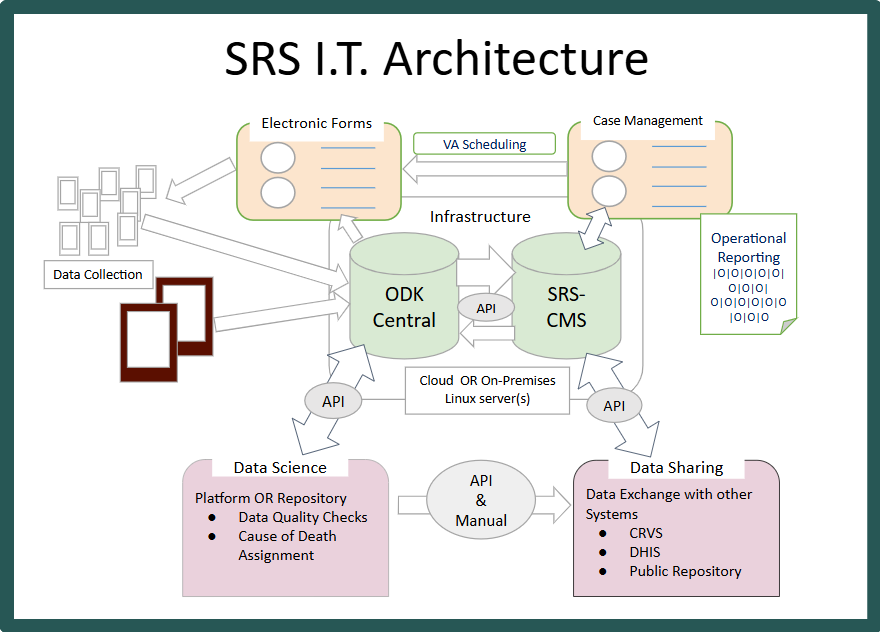
In this architecture:
- Data Collection on mobile devices use Electronic Forms informed by Case Management and scheduling to push data to central databases.
- Operational Reports are generated through this data collection and Case Management process.
- Data Science and Data Sharing are performed using application programming interfaces (APIs) and other software tools on the data housed in those databases.
The rest of this section describes infrastructure requirements and considerations for this generic architecture.
Infrastructure & Databases: Electronic Forms
Underlying electronic forms is the data collection platform. The data collection platform will provide an interface for designing forms and workflow, and it will provide core functionality of serving blank forms, receiving, and storing completed forms. The choice of data collection platform will be one of the key upfront decisions. Choose a mature and proven system with an accessible database. Major functions of the data collection platform include:
- Serving blank forms to community and provincial data collectors
- Receiving and storing form data (i.e., serving as a data repository)
- Hosting raw data, with which other platforms will interact
Tech Tip: Offline Data Collection
Is offline data collection needed? If Community and Provincial data collectors need to be able to collect data offline and sync those data elements up to a central server after the fact, that will be a key factor in choosing the relevant data collection platform.
Infrastructure & Databases: Case Management Platform
The case management platform allows events to be tracked through the system and follow-ups (such as a verbal autopsy) to be scheduled and performed. Infrastructure & Databases key functionality to enable Case Management includes:
- Providing tools to manage data collection operations (e.g., user accounts, assignments, activity monitoring, report generation, interactive maps)
- Hosting a data repository for cleaned and merged data
- Communicating with the data collection platform (often in two-way interaction)
- Communicating with the analysis platform (often in one-way interaction from case management to analysis)
Infrastructure & Databases: Operational Reporting & Data Science
In terms of infrastructure, Operational Reporting and Data Science share common goals. For example: errors or anomalies found in the data either in fieldworker performance (through Operational Reporting) or in the SRS data itself (through Data Science) may need to be reported back to Data Collection. This can be an argument in favor of combining or at least connecting data collection and data analysis platforms. Infrastructure & Databases key functionality to enable Operational Reporting and Data Science includes:
- Providing a platform for cleaning, merging, and analyzing data
- Serving a data repository for identifiable and deidentified analytic data sets (which could be the same or different data repository from the Electronic Forms, above)
- Enabling tools for statistical calculations and visualizations
Infrastructure & Databases: System Compatibility, Integration, & Interoperability
System Compatibility, Integration, & Interoperability is a very complex topic, which requires extensive country input and coordination. An entire section of this Handbook is devoted to this topic; however, if the country teams choose to explore technical data exchange between systems (such as application programming interfaces [APIs] or other direct integration), infrastructure will come into play. Infrastructure & Databases key functionality to enable System Compatibility, Integration, & Interoperability includes:
- Enabling technical compatibility of systems for information sharing (e.g., can the systems talk to each other across different operating systems, hosting mechanisms, security protocols, etc.?)
- Ensuring the security of the systems to handle relevant protected health and identifiable information
Tech Tip: Public Data Sharing
For publicly shared data, use an isolated physical server or data repository that does not contain any protected data. This reduces the risk of accidental exposure of protected data.
Hardware
A key decision to be made is whether the SRS applications and databases will be hosted on a cloud server or in a physical server (on premises or colocated). In general, it is easier and initially cheaper for IT teams to setup and manage cloud servers. The cost savings can dissipate over time.
| Option | Advantages | Disadvantages |
|---|---|---|
| Cloud Server |
|
|
| Physical Server |
|
|
Tech Tip: Physical Server Capacity and Backups
Many countries choose to use Physical Servers to comply with data privacy and security regulations. If you choose this option, buy servers that can handle twice of the expected capacity of the system in terms of processing speed, memory, and storage to best avoid future upgrades.
Sustainability Tip: Server Maintenance
Ensure that the server, whether cloud-hosted or physical, has multiple administrators who know all login information to prevent a single point of failure. Furthermore, ensure that a comprehensive server backup plan is in place. This is often easier for a cloud server; in the event of a physical server, ensure that backups are also located at a different physical location for appropriate redundancies.
Tools
None
Software
Specific software recommendations for Case Management, Data Science, and System Compatibility, Integration, & Interoperability are discussed in later sections of this Handbook. The software recommendations below focus specifically on Infrastructure and Databases.
Operating Systems
Either Linux or Windows systems can be used for SRS operations. Make the choice based on software requirements, cost, and the existing IT team’s skillset. Most of the candidate software systems that are discussed in later sections of this handbook can be deployed using containers such as Docker, which allows for easy deployment on a variety of Operating Systems.
Data Collection & Central Database
In most SRS system designs, the Data Collection platform serves as a central database of record for other SRS products. The following subsections describe candidate data collection systems and their relationship to a central database.
Candidate Systems
Many candidate systems for data collection exist with different requirements and features. A comparison of data collection platforms can be found below.
Tech Tip: Choose an ODK-based system
Based on a long track record of successful use in SRS projects and other similar data collection efforts, using an OpenDataKit (ODK)-compatible system (e.g., ODK, Kobo, ONA, SurveyCTO) will best ensure compatibility with other SRS tools, software, and workflows. ODK is an open-source mobile data collection platform that has been extensively utilized since the late 2000s. It was designed as an Offline system, and thus it is strongest in that context.
Most ODK systems run on PostgreSQL database architectures, making it easy to stand up additional Postgres databases to house other SRS data as needed. However, other SQL-based databases, such as MySQL, can be used based on country preference. ODK tools are available through the primary software project, but ODK-compatible customized systems have also been released, using the same standard and ensuring cross-compatibility. Any of these ODK-compatible applications can be used for SRS. A comparison between the main ODK tools and ODK-compatible tools can be found on the ODK website.
Advantages and Disadvantages of Data Collection Platforms
This table attempts to provide advantages and disadvantages between candidate data collection platforms, including the recommended ODK ecosystem.
| Platform | Advantages | Disadvantages |
|---|---|---|
| ODK (Open Data Kit) | Offline data collection, Long track record, Broad user base, many tools from VIVA, highly adaptable, longitudinal support, API and web management interface, Open source | Limited features for Online data collection |
| Kobo, ONA, SurveyCTO (Customized ODK systems) | Many features from ODK Aggregate and some custom features | Usage fee. Limited features for Online data collection. |
| CommCare | Offline data collection, strong track record. | Forms must be designed using web interface. Usage fee. Limited features in Online data collection |
| CSPro | Designed for offline context and offline management. Strong track record. Developed and supported by US Census Bureau. | Management is via Windows based system. Programming interfaces in windows format are dated. Limited support for web distribution and management. Limited API via CSWeb. |
| Survey Solutions | Offline data collection, strong track record, significant user base, longitudinal support, API and web management interface, API and web management interface, advanced online form designer | Forms must be designed using web interface. |
| Redcap | Strong features for online data collection, long track record, broad user base, longitudinal support, API, web management interface | Not designed for large scale offline data collection. |
| Custom | Can be built to fit unique situations. A good option in areas with strong internet connectivity. | Starting from scratch requires more resources and time. Risk of re-inventing the wheel. Longer testing period. Difficult to match features of existing offline systems. |
Stories
Zambia
Architecture Design
Due to country data privacy regulations, Zambia’s National Public Health Institute (ZNPHI) chose to stand up private physical servers to host their SRS programs and technology. They have established relationships with server hosting providers from past surveillance projects that enabled this decision. In terms of a Data Collection platform, when ZNPHI was initially implementing SRS, an HIV-based mortality surveillance program was already implemented at the Ministry of Health using Kobo Toolbox. While Kobo was working well for the MOH implementation, the ZNPHI chose to switch to ODK-branded products (i.e., ODK Central) for their centralized data hosting and maintenance due to the fact that the ZNPHI IT team was already comfortable with ODK Central and its derivative tools. As stated in the Tech Tip above, both tools are ODK-compatible systems, so the underlying system architecture did not change when making this switch.
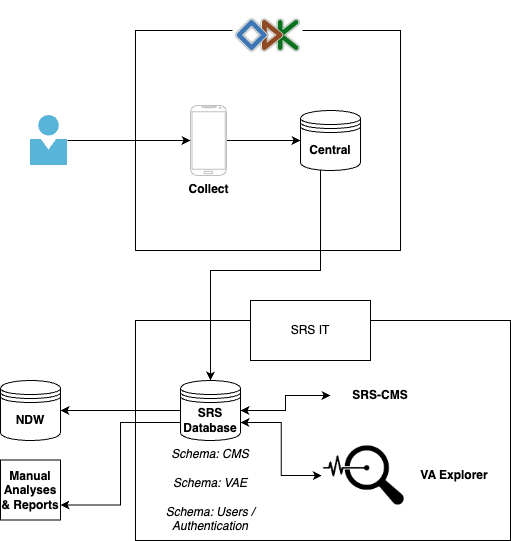
As part of initial system design workshops, ZNPHI developed the following infrastructure architecture diagram, where field teams use ODK-based products to collect the data, which then flow into an ODK Central database. A separate PostgreSQL database of record, then, is used to house all SRS data, including supporting other SRS systems. Separating the original ODK data from the other SRS operations also creates an inherent data backup in the system, where all raw and unprocessed data is stored, untouched, in ODK.
During implementation, this architecture diagram changed over time based on the needs of the program; however, it still serves as one model for other countries and highlights the key architecture decisions to be made.
| Last updated |
|---|
| Feb 28, 2026 |